
The place where I reblog helpful resources for my art blog, @molagboop
905 posts
Art Un-Tips
Art Un-Tips
Here are some ways to see improvements in your drawing quality and productivity through inaction, not action. They’ve worked for me and may help you too.
use less colours. It forces you to carefully consider your colour choices, not draw things just because you see them as a certain colour
use less layers. Don’t waste time flipping between layers, just separate the essentials (line, colour, shadow…)
don’t be pedantic about lineart. Most people don’t notice small blips in lineart, and unless you’re doing vector or professional art, the time trade-off isn’t worth it
lower your stabilizer. Low levels are enough to assist with curves. Higher levels make sharp turns hard. Adjust to your comfort, but see how low you can go
quit sooner. Spending excessive time on one drawing can be a bad habit. If you’re learning, you want to draw many different things, so quitting and moving on helps
-
 d0g-m0tif liked this · 1 year ago
 -
 guineveresgarden liked this · 1 year ago
 -
 artking-4 reblogged this · 1 year ago
 -
 jesusalonsogomez liked this · 1 year ago
 -
 dreamingcoyotes reblogged this · 2 years ago
 -
 7-8-9 liked this · 2 years ago
 -
 modarthelp reblogged this · 2 years ago
 -
modarthelp liked this · 2 years ago
-
 bigpaps07-blog liked this · 2 years ago
 -
 hardtobeasaintdotmp3 liked this · 2 years ago
 -
 ecrivainescence reblogged this · 2 years ago
 -
 raspbrrytea liked this · 2 years ago
 -
 uminoyuurei liked this · 3 years ago
 -
 eatenbyagrue reblogged this · 3 years ago
 -
 callmekohaii reblogged this · 3 years ago
 -
 somanyspoons liked this · 3 years ago
 -
 artttipsss reblogged this · 3 years ago
 -
 hoiimtemmi liked this · 4 years ago
 -
 tutoriarts reblogged this · 4 years ago
 -
 roboticskulls liked this · 4 years ago
 -
 idonthaveatum-blr reblogged this · 4 years ago
 -
 janebush08-blog liked this · 4 years ago
 -
 spite-cadet reblogged this · 4 years ago
 -
spite-cadet liked this · 4 years ago
-
 stuffnrandomshi reblogged this · 4 years ago
 -
 kiliane liked this · 5 years ago
 -
 ceryphil liked this · 5 years ago
 -
disobedientkey liked this · 5 years ago
-
 treegremlin reblogged this · 5 years ago
 -
 justtoby22 liked this · 5 years ago
 -
 toastymarshie liked this · 5 years ago
 -
 concerto-roblox reblogged this · 5 years ago
 -
concerto-roblox liked this · 5 years ago
-
 dragon-on-ice liked this · 5 years ago
 -
 pristine-love liked this · 5 years ago
 -
 bugybug500 liked this · 5 years ago
 -
 strawburrieslushie liked this · 5 years ago
 -
 moldy-juice liked this · 5 years ago
 -
 tangepr liked this · 5 years ago
 -
 starlitteas reblogged this · 5 years ago
 -
 pleiadestea liked this · 5 years ago
 -
 noritaro reblogged this · 5 years ago
 -
noritaro liked this · 5 years ago
-
 okular-porcelanowy liked this · 5 years ago
 -
calicokayla liked this · 5 years ago
More Posts from Molagblep


ive never really made a tutorial before but i thought i’d try!
all my portrait paintings are done on a 2000-3000 pixel canvas with 300 dpi using the two brushes shown above with varying opacity
(note: a flat steak brush texture can be found in many basic deviantart paint tool sai brush downloads! don’t worry if it’s not the exact one im using, i have several from different sources and they all generally do the same thing with the right settings)
What effects did you use on the A2
Gradient, those dots thingies (it’s one of Photoshop filters), chromatic aberration, noise. That’s basically all.


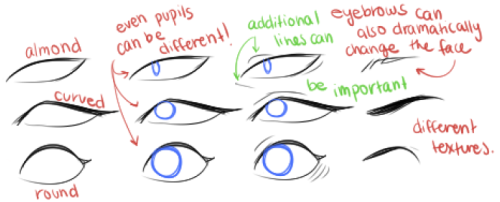


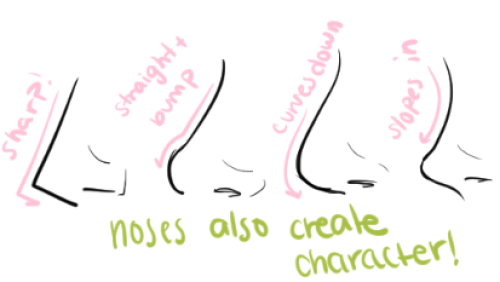
for the anon who needed this! hope it helps :)

art cheats
hello i am here today to not lose track of the art cheats i have discovered over the years. what i call art cheat is actually a cool filter/coloring style/way to shade/etc. that singlehandedly makes art like 20 times better
80’s anime style
glitch effect
glow effects
adding colors to grayscale paintings
foreshortening ( coil )
foreshortening ( perspective )
clipping group (lines)
clipping group (colors)
dramatic lighting ( GOOD )
shading metal
lighting faces
that is all for today, do stay tuned as i am always hunting for cool shit like this